Thursday, July 23, 2009

OpenBSD

OpenBSD is a Unix-like computer operating system descended from Berkeley Software Distribution (BSD), a Unix derivative developed at the University of California, Berkeley. It was forked from NetBSD by project leader Theo de Raadt in late 1995. The project is widely known for the developers' insistence on open source code and quality documentation, uncompromising position on software licensing, and focus on security and code correctness. The project is coordinated from de Raadt's home in Calgary, Alberta, Canada. Its logo and mascot is a pufferfish named Puffy.

OpenBSD includes a number of security features absent or optional in other operating systems and has a tradition of developers auditing the source code for software bugs and security problems. The project maintains strict policies on licensing and prefers the open source BSD licence and its variants—in the past this has led to a comprehensive licence audit and moves to remove or replace code under licences found less acceptable.

As with most other BSD-based operating systems, the OpenBSD kernel and userland programs, such as the shell and common tools like cat and ps, are developed together in a single source repository. Third-party software is available as binary packages or may be built from source using the ports tree.

The OpenBSD project maintains ports for 17 different hardware platforms, including the DEC Alpha, Intel i386, Hewlett-Packard PA-RISC, AMD AMD64 and Motorola 68000 processors, Apple's PowerPC machines, Sun SPARC and SPARC64-based computers, the VAX and the Sharp Zaurus

Wednesday, July 08, 2009

Processor architectures

ARM

ARM is designing and licensing high-performance chips requiring a relatively low power envelope, which would constitute an ideal basis for netbooks, and has touted these as an alternative platform. Despite this, ARM has had very little success in establishing a market for their chips in netbooks, likely because of incompatibilities of their ARM architecture to the established x86 software ecosystem (primarily the dominant Microsoft Windows operating system, Linux is fully compatible). Freescale, a manufacturer of ARM chips, has projected that by 2012 half of all netbooks will run on ARM and there has been much speculation as to a version of the upcoming Windows 7 compatible with ARM. In June 2009 nVidia announced a dozen mobile Internet devices running Tegra, some of which will be netbooks.

MIPS

Some Ultra-Low Cost netbooks feature a MIPS CPU. The 64-bit Loongson MIPS microprocessor is also used for higher-end applications.

x86

One report at the end of 2008 suggested the typical netbook featured a 3-lb (1.4 kg) weight, a 9-inch (23 cm) screen, wireless Internet connectivity, Linux or Windows XP, an Intel chip, and a cost of less than US$ 400. The x86-compatible VIA Technologies C7 processor is powering netbooks from HP and Samsung. VIA has also designed the Nano, a new x86-64-compatible architecture targeting lower priced, mobile applications like netbooks.

Tuesday, June 30, 2009

Net Work Cards

What is a network card?

A network card (also called a Network Adapter or Network Interface Card, or NIC for short) acts as the interface between a computer and a network cable. The purpose of the network card is to prepare, send, and control data on the network.

A network card usually has two indicator lights (LED's):


* The green LED shows that the card is receiving electricity;

* The orange (10 Mb/s) or red (100 Mb/s) LED indicates network activity (sending or receiving data).

To prepare data to be sent the network card uses a transceiver, which transforms parallel data into serial data. Each cart has a unique address, called a MAC address, assigned by the card's manufacturer, which lets it be uniquely identified among all the network cards in the world.

Network cards have settings which can be configured. Among them are hardware interrupts (IRQ), the I/O address and the memory address (DMA).

To ensure that the computer and network are compatible, the card must be suitable for the computer's data bus architecture, and have the appropriate type of socket for the cable. Each card is designed to work with a certain kind of cable. Some cards include multiple interface connectors (which can be configured using jumpers, DIP switches, or software). The most commonly used are RJ-45 connectors.
Note: Certain proprietary network topologies which use twisted pair cables employ RJ-11 connectors. These topologies are sometimes called "pre-10BaseT ".

Finally, to ensure that the computer and network are compatible, the card must by compatible with the computer's internal structure (data bus architecture) and have a connector suitable for the kind of cabling used.

Friday, June 19, 2009

Video Feature Connector Pinouts.

Pinout details

Pin

Name

Function

1

PD0

Dac Pixel data bit 0

2

PD1

bit 1

3

PD2

bit 2

4

PD3

bit 3

5

PD4

bit 4

6

PD5

bit 5

7

PD6

bit 6

8

PD7

bit 7

9

-

Dac Clock

10

-

Dac Blanking

11

-

Horizontal Sync

12

-

Vertical Sync

13

-

Ground

14

-

Ground

15

-

Ground

16

-

Ground

17

-

Select Internal Video

18

-

Select Internal Sync

19

-

Select Internal Dot Clock

20

-

Not Used

21

-

Ground

22

-

Ground

23

-

Ground

24

-

Ground

25

-

Not Used

26

-

Not Used


And I assume that pins 1 - 12 are outputs, and 17 - 19 are inputs. Is this correct?

The reason is this - I have a Rombo Media Pro+ video digitising card. It chroma keys its output into the vga monitor signal. However, although it is supposed to work with an ET-4000 with Hi-colour RAMDAC, the colours on screen behave as if the top 2 bits of colour information are missing, and red, green, blue signals are swapped around. Rombo has suggested that this may be due to insufficient buffering on the feature connector outputs, and is happy to sell me a buffer device for 50 pounds. I would rather save about 45 pounds, and build my own. I assume it would require (for example) a 74F244 buffer IC(or two).

Wednesday, May 20, 2009

KVM switch problems

There are two problems with VGA and KVM switches: the pin-9 problem and the pin-12 problem.


The pin 9 problem

Some monitors wait for a valid +5V level (TTL) on pin 9, using this signal to detect the computer. If the KVM switch doesn't provide +5V (pin 9 is floating) or pin 9 is missing on the connector of the cable, the monitor will not startup properly (sometimes the I/O light will flash slowly). The solution is to hardwire the console-side pin 9 of the KVM switch to +5V and ensure that the cable between the KVM switch and console has a wired pin 9.

The pin 12 problem

As mentioned under 'Disabling DDC', a machine connected to a KVM switch, but during startup not connected throughout the KVM switch to the console, will fall back to the default (lower) resolution. The solution is to remove the pin from one end of the VGA cable and to disable any plug and play for the monitor. Systems which use X11 to control the display (such as GNU/Linux or *BSD) will need to edit /etc/X11/xorg.conf so that:

Tuesday, April 28, 2009

Random Access Memory


Random access memory (usually known by its acronym, RAM) is a form of computer data storage. Today it takes the form of integrated circuits that allows the stored data to be accessed in any order (i.e., at random). The word random thus refers to the fact that any piece of data can be returned in a constant time, regardless of its physical location and whether or not it is related to the previous piece of data.

This contrasts with storage mechanisms such as tapes, magnetic discs and optical discs, which rely on the physical movement of the recording medium or a reading head. In these devices, the movement takes longer than the data transfer, and the retrieval time varies depending on the physical location of the next item.

The word RAM is mostly associated with volatile types of memory (such as DRAM memory modules), where the information is lost after the power is switched off. However, many other types of memory are RAM as well (i.e., Random Access Memory), including most types of ROM and a kind of flash memory called NOR-Flash.

Thursday, April 16, 2009

Intel integrated circuits


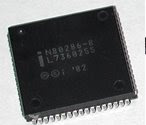
Among the most advanced integrated circuits are the microprocessors or "cores", which control everything from computers to cellular phones to digital microwave ovens. Digital memory chips and ASICs are examples of other families of integrated circuits that are important to the modern information society. While cost of designing and developing a complex integrated circuit is quite high, when spread across typically millions of production units the individual IC cost is minimized. The performance of ICs is high because the small size allows short traces which in turn allows low power logic (such as CMOS) to be used at fast switching speeds.